Mastering Java Packages: Understanding and Utilizing Advanced Features
A comprehensive guide to Java packages - how to create, use, and leverage advanced features for better code organization.
In layman’s language, a package is nothing but a folder that contains a similar type of class and interface. Java has two types of packages: built-in and user-defined packages.
Here in this article, we look at:
- Introduction to Java packages
- How to create and use a Java package
- Built-in Java packages
- Package naming conventions
- Advanced features of packages
Introduction to Java Packages
Java packages are a way to organize and group related classes, interfaces, and other types in a single unit. They provide a way to structure and reuse code, making it easier to manage, maintain, and distribute. Packages are an important part of the Java programming language and are widely used in enterprise and open-source projects. Packages create a hierarchical structure that allows classes and other types to be grouped together in a logical manner.
How to Create and Use a Java Package
Java packages are created by simply putting “package (keyword) and its qualified name” at the beginning of the source code. It is always the first line of source code. For example, the following line of code creates a package named “com.example.mypackage”:
package com.example.mypackage;To use a class from a package in another class, we have to use import com.example.mypackage.classname. It’s also possible to import all the classes from a package by using the wildcard character (*) at the end of the package name.
import com.example.mypackage.*;
              // or
import com.example.mypackage.classname;
Built-in Java Packages
Java is an extremely popular language. It has several built-in classes and interfaces for common programming tasks.
Here is a list of widely used packages:
- java.lang
- java.util
- java.io
- java.net
- java.sql and many more
5 Rules of Package Naming Conventions in Java
-
Use reverse-domain-name notation: Package names should be based on the domain name of the organization that created the package, but in reverse order. For example, if your organization’s domain name is example.com, you should use the package name com.example.
-
Use lowercase letters: Package names should be in all lowercase letters, as it is the Java naming convention for packages.
-
Be specific and descriptive: Package names should be specific and descriptive. They should indicate the purpose of the package and the types of classes that it contains. For example, if a package contains classes for working with user accounts, the package name should indicate this, such as com.example.accounts
-
Avoid generic names: Package names should avoid generic or overly broad names, such as com.example.util or com.example.misc, as it does not convey information about the package’s purpose.
-
Avoid using version numbers: Package names should avoid including version numbers, as it makes it difficult to upgrade the package. It’s better to include version number in artifact id.
Advanced Features of Packages
Due to package features, Java has the following benefits:
- Controlling class accessibility
- Package-private classes and interfaces
- Package-level annotations
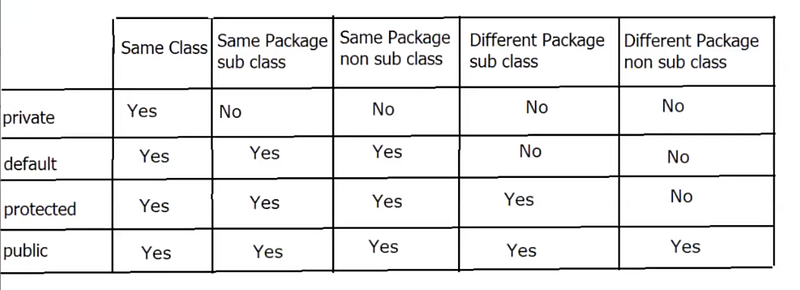
Any field in a class that is private can only be accessed by members of the same class. Default field only accessed by same class, same package subclasses, and same package non-subclasses. Check out the above image for public and protected.
Summary
Java packages are a way to organize and group related classes, interfaces, and other types in a single unit. They provide a way to structure and reuse code, making it easier to manage, maintain, and distribute. Java packages are a powerful feature that aid in organizing and grouping classes and interfaces for better maintainability and reusability.
In the upcoming article, we will go over the advanced features of packages in greater detail.
Originally published on Medium